What is ACME?
This article describes the support for the protocol Automatic Certificate Management Environment (ACME) in Nexus Smart ID.
The ACME (Automatic Certificate Management Environment) service is used to automate the process of issuing X.509 (PKIX) certificates using the ACME protocol, as defined in RFC 8555.
The ACME protocol is supported by many standard clients available in most operating systems for automated issuing, renewal and revocation of certificates. For example, the certbot ACME client can be used to automate handling of TLS web server certificates for common HTTP servers, such as Apache and Nginx. For more information, see ACME Client Implementations.
Many critical services and servers are already equipped with certificates proving their identity in a secure way, but lack the automation for example to renew certificates when the existing ones are expiring. Critical services often stop due to the fact that their certificate expire and manual processes are involved. The automation that comes with ACME enables universal encryption on the Internet.
ACME is also readily available in many server applications and devices that need X.509 certificates, making it easier to automatically provision certificates. Many devices, such as servers, printers and NAS (Network-attached storage) devices, also come with support for ACME.
The ACME service in Protocol Gateway (PGWY) supports both public-facing internet ACME account creation and ACME account creation where a pre-registered secret key must be shared beforehand.
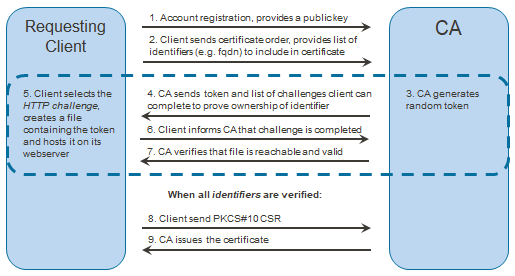
ACME protocol flowchart
The diagram illustrates how an ACME client can obtain a certificate without any human interaction. In the dashed region, the client proves ownership of the domain using an HTTP-based challenge. There are other challenge methods available for ACME, Certificate Manager also implements the DNS challenge. Step 1 is optional, clients can be pre-registered in Certificate Manager – but then the clients need to be manually provisioned.
Why use ACME?
Here are some common drivers for deploying ACME in a production environment:
-
Full automation of key and certificate management
-
Desire to get server-side monitoring and alerting
-
More structured process for requesting certificates to edge devices or printers
-
Streamlined interaction between requesters and administrators
-
Aiming to use an arbitrary ACME client to interact with private or public trusted CAs
-
Possibility to combine software as a service and on-premise installations
-
Audit-friendly reporting to assure compliance, and enhance incident management
Request certificate via ACME and Protocol Gateway
Nexus' ACME solution is based on Protocol Gateway:

The ACME process is made up of the following major steps:
-
- Create ACME account - The ACME client creates an account on the ACME server. In Certificate Manager, this is handled as registrations that are stored in the Certificate Manager database.
The ACME service in Protocol Gateway can be configured so that creating ACME accounts either:
a. is allowed for all requesting ACME clients
or
b. requires a pre-registration in Certificate Manager - Create order - The ACME client requests a certificate by creating an order for certain domain names.
If the ACME service in Protocol Gateway is configured to require pre-registration, then the pre-registration can also contain a list of allowed domain names per registration. - Validate challenge - The ACME server verifies that the requested domain names are controlled by the ACME client, by validating a set of server-issued challenges. For example, the client may need to prove that it can place a token at a pre-determined place at a web-server acting for the requested domain name, or that it can create a DNS record for the domain. The supported challenge validation methods are ‘http-01’ and ‘dns-01'.
- Issue certificate - The ACME service in Protocol Gateway uses Certificate Manager to issue a certificate, using a certificate signing request (CSR) provided by the ACME client.
- Create ACME account - The ACME client creates an account on the ACME server. In Certificate Manager, this is handled as registrations that are stored in the Certificate Manager database.
Certificates that have been issued by an authorized ACME account can be revoked via the ACME protocol, as long as certain requirements apply. For more information, see Requirements to revoke certificates issued by ACME account.
Manage ACME accounts
The ACME service in Protocol Gateway uses existing registration functionality in Smart ID Certificate Manager (CM) for ACME account management. This enables administrators and registration officers in CM to manage existing ACME accounts using the RA client, like other registrations. Additionally, since the ACME service in Protocol Gateway uses existing functionality in CM for issuing certificates, this enables administrators and officers to combine ACME certificates with existing powerful functions such as publishing issued certificates, customizing the certificate formats, OCSP updates and management of issuance.